
Code running on PLCs is a frequent cause of unplanned downtime, and the cost is steep: in an ABB survey of 3,600 industrial decision-makers, 76 percent estimated that unplanned downtime can run as high as $500,000 per hour. In the worst cases it also puts worker safety at risk. Many of these failures trace back to small human errors that testing could have caught, and yet only a fraction of automation engineers have ever written a single automated test for PLC code.
This guide is a broad survey of the automated verification methods available to PLC teams and the lower-cost ways to make them effective. The goal is not to enumerate every tool for every vendor, but to map the major processes and themes so that teams can identify which ones are the most cost-effective and apply them where they mitigate the greatest risk.
Why continuous, automated verification matters
Effective verification runs automatically and continuously, not manually and periodically. The difference is the feedback loop: when every code change is checked against existing functionality, the engineer learns within minutes whether a new edit broke an assumption made somewhere else in the system. That assurance is essential for multi-person teams, because the assumptions one engineer makes are easily broken by another.
The same feedback loop is a prerequisite for any AI-assisted development workflow, since a model attempting to write or modify PLC code needs fast, automated signals to correct itself. Whether the author is a person or an AI model, the result of a continuous loop is the same: development is faster, the code is more correct, and the project is cheaper to maintain over its life.
Even without a strong culture of continuous verification, a growing number of engineers have seen the value. Many of them encountered software practices such as CI/CD workflows and test-driven development, where tests are written alongside the code, and every change is validated against regressions. Once an engineer has worked this way, going back is hard. Most describe it the same way: after seeing it work, they cannot imagine doing it any other way.
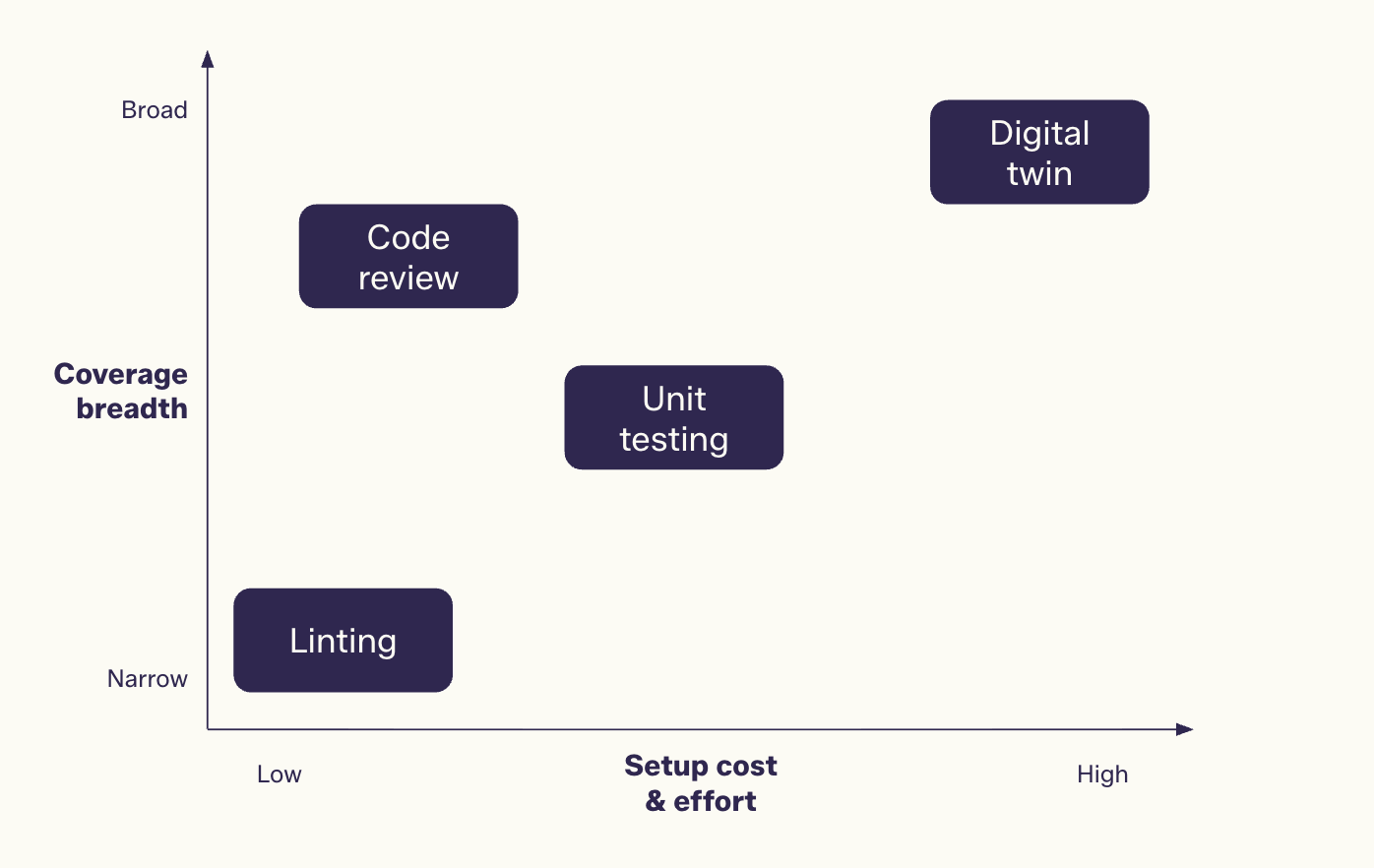
Verification methods by setup cost and coverage.
Linting and static analysis
Linting is a form of static analysis, a category of verification in which software tools read the code and detect potential problems without executing the code. A linter can catch simple mistakes like misspellings and can be configured to enforce a style guide across a project. A linter can be run by hand, but that depends on someone remembering, and the longer the gap between runs, the further the code drifts out of compliance.
The most effective approach is to run the linter on every code change so feedback arrives as soon as possible after the edit. There are two common ways to do this:
- In workflows built on version control, pull requests or merge requests with branch protection rules can block code from being merged until it passes the checks.
- In workflows built on automated backups, the linter can run against the backup files and produce a report of violations.
A linter version control workflow is usually the stronger option because it is preventative rather than reactive, and it routes feedback directly to the engineer making the change. The violation is caught before it ever reaches production.
Code review: a second set of eyes
Version control workflows also make structured code review practical. In a code review, a second engineer who didn’t write the change reads through it and records observations. Notes might be questions, comments, and issues that must be resolved before the code reaches production. Review is especially valuable when the code in question is reused across multiple projects. It can happen synchronously, with the author present, or asynchronously, with the change sent to the reviewer to read on their own time.
Review formats range widely in formality:
- Over-the-shoulder reviews, where both engineers walk through the change together at a single workstation
- Mob reviews, where a group reviews the code on a large screen or projector
- Paper reviews, using printouts marked up with pen and highlighter
- Virtual review platforms, some integrated with a version control system and others standalone, including tools well suited to reviewing screenshots of graphical code
- LLM-based reviewers, which can process a change and return a list of potential mistakes
Whatever the format, complete and updated records are the goal. For each review, a team should retain three things: every version of the change that was submitted since reviews often run through several rounds; every issue raised and how it was resolved, whether by a code fix, an action item, or a request for further research; and a record of which reviewers, if any, gave final approval. Mistakes are normal. The problem is repeating them, which is exactly what happens when no one remembers how they were made.
Top-down verification: digital twins and virtual commissioning
A well-established verification method in the automation industry is the digital twin, also known as virtual commissioning. A team builds a virtual model of the physical equipment, with its real dimensions and specified characteristics, so the same PLC code can run against the model and behave exactly as it would on the floor. This supports development, and it also supports manual procedures such as Factory Acceptance Testing (FAT) and Site Acceptance Testing (SAT) without physical access to the machine. Decoupling code development from physical commissioning makes timelines more predictable, because the code can be developed and validated against the twin long before the machine is assembled, then deployed and run correctly on the first day it exists.
Digital twins are common during commissioning and rare during maintenance, and that’s a missed opportunity. Code configuration rarely stays static, and over time it drifts from the version that was originally tested and validated. That code drift is a frequent source of avoidable downtime that change validation against the twin before deployment would prevent. Running a full battery of tests by hand for every change would not be cost-effective, but automating the FAT and SAT procedures lets the code be validated continuously throughout the life of the machine, so engineers can move quickly while maintaining confidence in their changes.
It helps to think of virtual commissioning as a top-down verification process, and the approach carries real trade-offs:
- Execution time: these simulations run in real time, so a larger test battery takes longer to execute. When the goal is fast feedback, waiting 18 hours to run the full suite for a small configuration change defeats the purpose.
- Cost: simulation software is often expensive, the computation can be costly, and modeling the full behavior of a machine takes significant engineering time.
- Observability: when something fails, it can be hard to isolate which unit of code is misbehaving, which makes debugging slower.
None of this means the method is not worth it. In many cases the return is substantial, especially for teams that have already invested in building a digital twin.
Bottom-up verification: unit testing PLC code
Unit testing is the bottom-up counterpart to a digital twin. Instead of a large upfront investment to validate the entire system, a team validates a small unit of code for a much smaller cost. Many engineers are skeptical that unit testing is feasible for real-world PLC applications, which are often messy and tightly coupled, making it hard to isolate a unit that can be checked on its own.
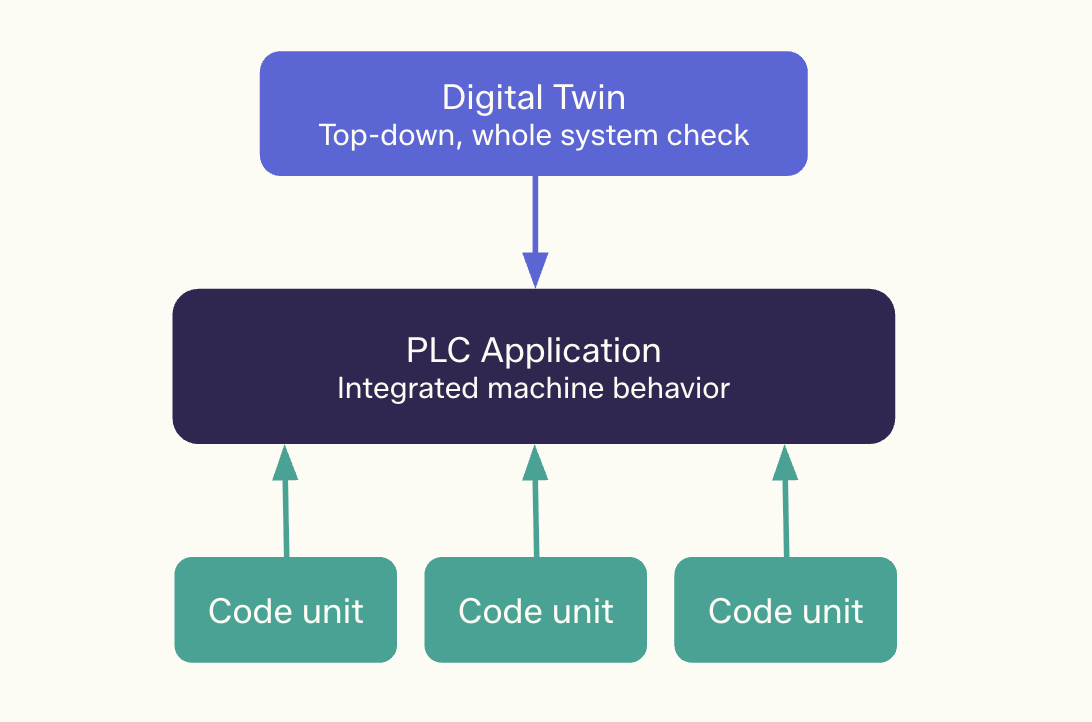
Top-down and bottom-up verification meet at the same PLC application.
Software faces the same problem, and the discipline’s answer is to treat testability as a design goal rather than an afterthought. Engineering already works this way through Design for Manufacturing (DFM), where the materials and processes used to build a product shape its design from the start. The same logic gives us Design for Test (DFT): as code is written, it should be organized so that tests are straightforward to write against it. That is not always easy, but there is almost always some logic that is cheap to test and high in value because it prevents costly mistakes. A practical first step is to make projects more modular and lean less on global state, since components with explicit inputs and outputs are far easier to validate than logic tangled up in the global state of the PLC.
The most common way to unit test PLC code is to maintain two projects, one for deployment and one for testing, with the test framework running on a physical PLC, a soft PLC, or an emulated PLC. The test project runs a sequence of operations against small code units, asserts the expected state of their outputs, and reports which tests failed. Engineers often build their own frameworks for this, though a small number of open-source options exist, such as TcUnit, which supply the test execution logic and a library of assertion statements.
An example
Picture a controls engineer making what looks like a trivial change to the motor control logic in a Rockwell Studio 5000 project, the routine that reads a start button and a stop button and decides whether the motor runs. The everyday cases are easy to reason about: the motor starts when the start button is pressed, and stops when the stop button is pressed. The cases that cause trouble are the unusual edge cases, like both buttons pressed at once or the motor sitting in a fault state. A good test makes those scenarios explicit. Each one sets up a condition, then asserts what should be true if the logic is working, and the engineer can capture them by moving the motor control logic into an Add-On Instruction (AOI), copying that AOI into a test project, and running every scenario in sequence to produce a simple report, an array of BOOLs recording which checks passed and which failed.
The question is when that test actually runs. Asking the engineer to run it before every deployment sounds reasonable, but people forget or skip the step under pressure, and running it once a release gives no feedback on the changes made in between. The stronger pattern removes the human from the loop entirely: the moment the engineer goes to make a change, the AOI is copied from the deployment project into the test project, deployed to an emulated or physical PLC, and run automatically, with the results read back before anything ships. When every check comes back green, the engineer deploys knowing the change has not quietly broken something that worked yesterday.
Choosing your entry point
The automation industry does not have to keep relying on manual, repetitive tasks. Whether a team starts with linting, code review, unit tests, or full digital twin validation, the principle is the same: make as much of the work as possible continuous and automated. Pick the lowest-friction entry point for your team, prove the value on a contained piece of logic, and expand from there.
Every method in this guide depends on the same foundation: a reliable record of what the code is and how it changed. Version control workflows and automated backups are what make linting, review, and continuous testing practical at the controls layer, because they give every change a traceable history and a last-known good state to return to. Copia brings that foundation to OT: Source Control for version control workflows and DeviceLink™ for automated device backups, built for the realities of multi-vendor plant environments. And with Copia Actions, the newest addition to the platform, you can run verification flows automatically every time the code changes, so the continuous, automated loop this guide describes becomes the way your team works by default.
See how it fits your environment. Request a demo.